|
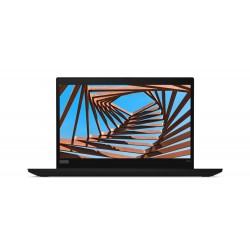
OS: Windows 10 Pro CPU: i5-8265U 1.6 GHz RAM: 8 GB Display: 13.3 inch SSD: 256 GB Battery: 48 Wh |
| Processor Lenovo ThinkPad X390 20Q0000HUE | |
| Processor model: | i5-8265U |
| Processor cores: | 4 |
| Processor family: | 8th gen Intel Core i5 |
| Processor frequency: | 1.6 GHz |
| Processor boost frequency: | 3.9 GHz |
| Processor cache: | 6 MB |
| Thermal Design Power (TDP): | 15 W |
| Software Lenovo ThinkPad X390 20Q0000HUE | |
| Operating system installed: | Windows 10 Pro |
| Operating system architecture: | 64-bit |
| Display & Graphics Lenovo ThinkPad X390 20Q0000HUE | |
| Panel type: | TN |
| Aspect ratio: | 16:9 |
| Contrast ratio: | 500:1 |
| Display brightness: | 250 cd/m² |
| Display diagonal: | 13.3 inch |
| Display resolution: | 1366 x 768 pixels |
| HD type: | HD |
| 3D: | No |
| LED backlight: | Yes |
| Touchscreen: | No |
| Discrete graphics adapter: | No |
| Discrete graphics adapter model: | Not available |
| On-board graphics adapter: | Yes |
| On-board graphics adapter model: | Intel UHD Graphics 620 |
| Memory Lenovo ThinkPad X390 20Q0000HUE | |
| Internal memory: | 8 GB |
| Maximum internal memory: | 8 GB |
| Memory clock speed: | 2400 MHz |
| Memory form factor: | On-board |
| Internal memory type: | DDR4-SDRAM |
| Storage Lenovo ThinkPad X390 20Q0000HUE | |
| SSD capacity: | 256 GB |
| SSD interface: | NVMe, PCI Express |
| SSD form factor: | M.2 |
| Storage media: | SSD |
| Number of SSDs installed: | 1 |
| Total SSDs capacity: | 256 GB |
| Total storage capacity: | 256 GB |
| LightScribe: | No |
| Optical drive type: | No |
| Card reader integrated: | Yes |
| Compatible memory cards: | MicroSD (TransFlash) |
| Network & Communication Lenovo ThinkPad X390 20Q0000HUE | |
| Antenna type: | 2x2 |
| Bluetooth: | Yes |
| Bluetooth version: | 5.0 |
| Wi-Fi: | Wi-Fi 5 (802.11ac) |
| Wi-Fi standards: | Wi-Fi 5 (802.11ac) |
| WLAN: | Intel Dual Band Wireless-AC 9560 |
| Interfaces/Ports Lenovo ThinkPad X390 20Q0000HUE | |
| HDMI version: | 1.4b |
| HDMI ports quantity: | 1 |
| Combo headphone/mic port: | Yes |
| Docking connector: | Yes |
| USB 3.2 Gen 1 (3.1 Gen 1) Type-A: | 2 |
| USB 3.2 Gen 1 (3.1 Gen 1) Type-C: | 1 |
| USB 3.2 Gen 2 (3.1 Gen 2) Type-C: | 1 |
| USB Power Delivery: | Yes |
| USB Sleep-and-Charge: | 1 |
| USB Type-C DisplayPort Alternate Mode: | Yes |
| Input Devices Lenovo ThinkPad X390 20Q0000HUE | |
| Numeric keypad: | No |
| Pointing device: | ThinkPad UltraNav |
| Spill resistant keyboard: | Yes |
| Windows keys: | Yes |
| Audio Lenovo ThinkPad X390 20Q0000HUE | |
| Audio chip: | Realtek ALC3287 |
| Audio system: | Dolby Audio Premium |
| Built-in microphone: | Yes |
| Number of speakers: | 2 |
| Number of microphones: | 2 |
| Speaker power: | 1 W |
| Built-in Devices Lenovo ThinkPad X390 20Q0000HUE | |
| Auto focus: | No |
| Front camera: | Yes |
| Front camera HD type: | HD |
| Front camera signal format: | 720p |
| Privacy type: | Privacy shutter |
| Privacy camera: | Yes |
| Power Lenovo ThinkPad X390 20Q0000HUE | |
| AC adapter power: | 65 W |
| Security Lenovo ThinkPad X390 20Q0000HUE | |
| Cable lock slot: | Yes |
| Fingerprint reader: | Yes |
| Password protection: | Yes |
| Trusted Platform Module (TPM): | Yes |
| Design Lenovo ThinkPad X390 20Q0000HUE | |
| Brand: | Lenovo |
| Family: | ThinkPad |
| Series: | X |
| Model name: | X390 |
| Part Number: | 20Q0000HUE |
| Product type: | Notebook |
| Form factor: | Clamshell |
| Product colour: | Black |
| Market positioning: | Business |
| Depth: | 217.2 mm |
| Width: | 312 mm |
| Height: | 16.9 mm |
| Weight: | 1.33 kg |
| Release Date: | 2020-01-07 |
| Battery Information Lenovo ThinkPad X390 20Q0000HUE | |
| Battery capacity: | 48 Wh |
| Battery type: | Lithium-Ion (Li-Ion) |
| Battery life: | 17.6 h |
| Quick charge: | Yes |
 | Gjbanj-Kec | April 26, 2024 |
| The laptop performs well for everyday tasks and office programs. The screen quality is decent for watching movies and YouTube. The storage capacity is sufficient for storing files, but adding more RAM could be beneficial. Not ideal for gaming due to limited CPU resources. Has enough USB ports for most users. | ||
| Reply | ||
| Glnalo | May 10, 2024 |
| I upgraded the memory to 16GB and replaced the 256GB SSD with a 512GB NVMe SSD | ||
| Reply | ||