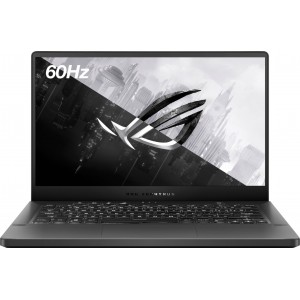
|
OS: Windows 11 Home CPU: AMD Ryzen 7 5000 Series RAM: 16 GB Display: 14" SSD: 512 GB Battery: Lithium-ion polymer |
| Processor ASUS ROG Zephyrus G14 14" GA401QH-211.ZG14BL | |
| Processor manufacturer: | AMD |
| Processor model: | AMD Ryzen 7 5000 Series |
| Processor model number: | 5800HS |
| Processor core: | 8-core |
| Software ASUS ROG Zephyrus G14 14" GA401QH-211.ZG14BL | |
| Operating system: | Windows 11 Home |
| Display & Graphics ASUS ROG Zephyrus G14 14" GA401QH-211.ZG14BL | |
| Screen size: | 14" |
| Screen resolution: | 1920 x 1080 (Full HD) |
| Touch screen: | No |
| GPU brand: | NVIDIA |
| Graphics: | NVIDIA GeForce GTX 1650 |
| Graphics type: | Dedicated |
| Memory ASUS ROG Zephyrus G14 14" GA401QH-211.ZG14BL | |
| Installed slot memory: | 16 GB |
| Type of Memory (RAM): | DDR4 SDRAM |
| Storage ASUS ROG Zephyrus G14 14" GA401QH-211.ZG14BL | |
| Storage type: | SSD |
| Solid state drive capacity: | 512 GB |
| Total storage capacity: | 512 GB |
| Input Devices ASUS ROG Zephyrus G14 14" GA401QH-211.ZG14BL | |
| Backlit keyboard: | Yes |
| Camera ASUS ROG Zephyrus G14 14" GA401QH-211.ZG14BL | |
| Front-Facing Camera: | No |
| Battery ASUS ROG Zephyrus G14 14" GA401QH-211.ZG14BL | |
| Battery type: | Lithium-ion polymer |
| Design ASUS ROG Zephyrus G14 14" GA401QH-211.ZG14BL | |
| Weight: | 3.64 lbs. |
 | Dawapo | April 11, 2024 |
| With an AMD Ryzen 7 5800HS processor, NVIDIA GeForce GTX 1650 GPU, and 16GB of RAM, this laptop is a powerhouse for gaming and multitasking. The 512GB SSD provides ample storage, while the Full HD display offers crisp visuals. Perfect for work, play, and entertainment. | ||
| Reply | ||
| Glbjmu$ | May 19, 2024 |
| I upgraded the memory to 32GB and replaced the 512GB SSD with a 1TB NVMe SSD | ||
| Reply | ||