| Specification Samsung Z2 |
| Secret codes Samsung Z2 |
| Hard reset Samsung Z2 |
| Screenshot Samsung Z2 |
|
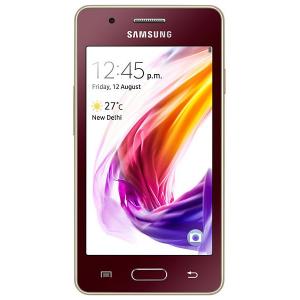
OS: Tizen 2.4 CPU: Quad-core 1.5 GHz Cortex-A7 Display: 4" inc Camera: 5 MP,
Single |
 |
Thomas Nilan Smartphone Expert |
| Thomas Nilan is a mobile phone expert with in-depth knowledge of the Android and iOS operating systems, who understands the settings of various hidden features that allow you to expand the capabilities of your smartphone, as well as get information about what is going on inside the phone for future repairs. He is an authority in his field, which has allowed him to become a ghostwriter for several technology publications, and he enjoys writing small mobile applications for testing smartphones. | |
 | Woviqy-Vyw | April 23, 2024 |
| I find the laptop to be a good choice for everyday tasks such as office programs, watching movies, and browsing the web. The screen resolution is decent for these activities, but not suitable for gaming. The hard drive capacity is sufficient for storing files, but more RAM would be beneficial. The number of USB ports is adequate for connecting peripherals. | ||
| Reply | ||
| Zigebu | May 15, 2024 |
| I upgraded the memory to 8GB DDR4 and the hard disk to a 500GB SSD for faster performance. | ||
| Reply | ||